Magic Piano by Smule
- 3.8
- Rating
- 50.00M
- Installs
- Free
- Price

 Analysis by App-foxy
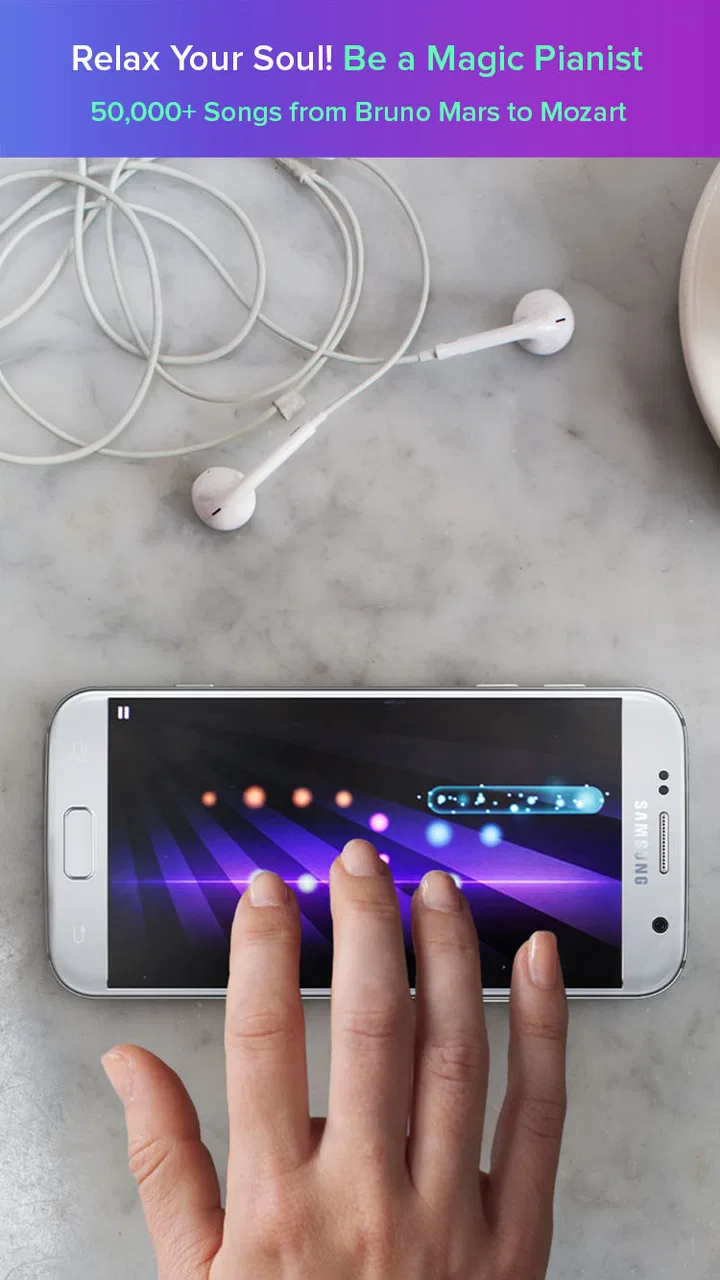
I tried Magic Piano as the kind of app I would open when I wanted to play music without carrying an instrument, reading sheet music, or committing to a formal lesson. It is a music and audio app from Smule built around the idea of turning familiar songs into playable piano arrangements. The appeal is immediate: instead of pressing conventional piano keys, I follow moving notes and tap them in time. That makes the first few minutes approachable, even if my piano experience is limited.
That simplicity is also the key to understanding the app. This is not a full digital piano for serious composition, and it is not a traditional rhythm game with a separate story or competitive campaign. It sits between the two. I get the satisfaction of performing recognizable music, while the guided interface removes much of the technical barrier. For casual practice, relaxation, and short bursts of entertainment, that balance works well. For someone who wants realistic finger technique or complete control over an instrument, it feels more restricted.
How the current experience feels in everyday use
The basic session is easy to understand. I choose a song, watch the notes arrive, and tap the corresponding areas of the screen as the music moves forward. The visual guidance helps me start playing before I have learned where every note belongs. I can concentrate on timing and rhythm rather than worrying about hand position, scales, or notation. That makes it particularly friendly for a first-time player who might find a conventional piano app intimidating.
You May Also Like

 AccuWeather: Weather Radar
AccuWeather Review: A Quick, Clear Forecast for Everyday Decisions
For everyday plans, the best forecast is the one you can understand quickly. AccuWeather makes rain timing, radar, and local conditions easy to act on, with a few trade-offs.

 Hill Climb Racing
Why Hill Climb Racing Still Turns Crashes Into One More Run
A tiny car, a bumpy hill and one more upgrade: Hill Climb Racing keeps resurfacing because its simple chaos makes every near-miss feel personal.

 AliExpress - Shopping App
AliExpress Makes Global Shopping Feel Personal, but Shoppers Bear the Risk
AliExpress turns a global marketplace into a pocket-sized discovery engine. Its reach is useful, its shopping loop compelling, and its trade-offs easy to miss.

 Lords Mobile: Kingdom Wars
Lords Mobile Is a Kingdom-Building Routine, Not a Quick Match
A case-by-case verdict on the building, battles, device demands, and social commitments that make Lords Mobile rewarding for some players and exhausting for others.

 PDF Scanner app - TapScanner
TapScanner Makes Paperwork Easier to Capture, Check, and Share
TapScanner makes scanning with a phone feel less like a rescue operation and more like a dependable step in getting work done. Its capture tools are useful, though not flawless.

 Block Blast!
 Shows How Much a Puzzle Game Can Leave Out
A quiet grid game shows why puzzle players increasingly value instant clarity, repeatable skill and low-pressure play—and where the genre still needs to catch up.
More From Our News Desk
View All News


My favorite use case is a short evening break. I can play a familiar melody for a few minutes, make a couple of mistakes, and try again without setting up anything. The experience is more active than simply listening to a playlist, but less demanding than practicing on a real keyboard. It also suits people who enjoy music games but do not necessarily want fast reflex challenges. The musical result gives each attempt a sense of progress, even when my performance is far from perfect.
The app’s store summary points from Bruno Mars to Mozart, and that range explains much of its identity. It is designed to make different kinds of music approachable through the same touch-based format. A modern pop song can attract someone who wants a familiar hook, while a classical selection can make the app feel more like a gentle introduction to piano repertoire. I would not treat those arrangements as replacements for the original recordings or authentic piano scores, but they do make the source material playable in a compact mobile format.
The controls are most comfortable when I give the screen my full attention. On a small phone, the note paths can feel crowded during busier passages, and my finger may cover the exact point I want to tap. A larger display is easier on the eyes and gives my hand more room, although the app remains more convenient than carrying a keyboard. Headphones also make a difference. They help me hear the rhythm clearly and make the performance feel more coherent, especially when the surrounding environment is noisy.
One useful habit is to begin with songs that feel comfortably familiar rather than immediately choosing the most challenging arrangement. Familiar melodies make it easier to notice whether I am tapping late or early. After that, I can replay the same selection while focusing on a different goal: first staying with the beat, then improving accuracy, and finally trying to maintain a smooth flow. This turns a quick game into a simple, self-directed practice routine.
What makes the touch format approachable
The guided note system is the strongest design decision here. A traditional piano simulator usually expects me to understand a keyboard layout, while a sheet-music app expects me to read notation. Magic Piano gives me a visual route through the song instead. That is why I would recommend it to a curious beginner who wants an immediate result rather than an explanation of music theory.
There is a trade-off, though. Because the interface tells me where and when to tap, I am learning the arrangement inside the app’s visual language, not necessarily learning how to reproduce it on a physical piano. Someone hoping to develop independent hand coordination, proper fingering, or sight-reading should pair this with lessons or a more conventional instrument app. It can build timing awareness and musical confidence, but it should not be mistaken for a complete piano curriculum.
The app is free to start, which lowers the risk for casual users. Smule offers in-app purchases ranging from ninety-nine cents to ninety-nine dollars and ninety-nine cents per item, so I would pay attention before unlocking anything. The sensible approach is to explore the free experience first and decide whether the available song selection and play style genuinely fit my habits. The highest-priced option is difficult to justify for someone who only expects occasional entertainment.
Its Everyone content rating also makes it easy to consider for a broad household audience. Even so, I would still treat purchases carefully if children use the device. The important question is not whether the app is easy to open, but whether the available content and optional spending match the way the phone or tablet is shared at home.
What has changed over the product’s life
Magic Piano has been available since June 13, 2012, which gives it a much longer history than a newly launched music game. That matters because its central concept has had time to settle: the app is not trying to be a full workstation, and it does not need to imitate every function of a professional piano program. Its continued identity is built around quick access to playable arrangements and a visual performance loop.
Smule is the developer behind the app, and the product’s longevity suggests an established place in mobile music rather than a brief experiment. I would still separate that history from assumptions about constant improvement. A long-running app can remain familiar and useful while also carrying design decisions that feel dated beside newer touch interfaces. The important point for a new user is that the core experience is easy to grasp, not that its age automatically guarantees a perfect modern fit.
For existing users, the stable concept is an advantage. If I return after time away, I do not need to relearn an entirely different type of instrument. The same basic relationship remains: select music, follow the visual notes, and improve through repetition. That continuity is valuable for people who use the app as a relaxing routine rather than chasing every new mobile trend.
At the same time, long-term users may want more depth than the central loop provides. Once the novelty of tapping familiar songs fades, the experience depends heavily on the breadth of the catalog, the variety of arrangements, and how much personal challenge I can create. I can extend its life by choosing harder pieces, replaying songs for cleaner timing, or using it as a warm-up before moving to a real keyboard. Without those self-imposed goals, sessions can become repetitive.
How it compares with other ways to play
Compared with a standard piano-learning app, Magic Piano is faster to understand and less demanding at the beginning. I do not need to study a lesson sequence before making music. The cost of that convenience is educational depth. A dedicated learning tool is usually the better choice if my goal is to read notation, learn chords, understand fingering, or follow a structured path toward playing an acoustic or electronic piano.
Compared with a basic virtual keyboard, it is more engaging because the song itself guides the session. A keyboard simulator gives me freedom to experiment with notes, but that freedom can feel empty when I do not know what to play. Magic Piano supplies direction and rhythm. If I want to improvise, compose freely, or test different voicings, the simpler keyboard alternative is more suitable.
It also differs from ordinary rhythm games. The musical framing makes the activity feel calmer and more personal than a score-focused challenge. I can play for relaxation without needing a competitive mindset. On the other hand, players who want elaborate stages, characters, or a deep progression system may find this format too focused on the song itself.
One non-obvious strength is how well it works as a bridge between passive listening and active practice. I can choose a song I already know, use the visual cues to understand its pulse, and then listen more carefully to the melody afterward. That does not turn me into a pianist, but it changes how I pay attention to phrasing and timing. For a music fan who wants a small amount of interaction without a serious lesson commitment, that middle ground is useful.
Where the experience still falls short
The biggest limitation is the gap between tapping a guided path and playing a physical piano. The app can make me feel musically involved, but it does not reproduce the weight, spacing, or expressive control of real keys. It is therefore a poor substitute for someone who needs practical keyboard training. I would skip it as a primary tool if my immediate goal were an exam, a recital, or learning a specific piece on an actual instrument.
Screen size is another practical concern. On a phone, longer sessions can cause finger fatigue and visual strain, particularly when the arrangement becomes dense. A tablet improves comfort, but it also makes the experience less pocket-friendly. I would test the app on the device I plan to use most often before deciding whether it can become a daily habit.
The free-to-start model can also affect how I evaluate the catalog. If the songs I most want are behind purchases, the initial impression may not represent the long-term value for me. I would avoid buying several items impulsively. Instead, I would identify whether I enjoy the underlying play style with accessible content and only then consider a small purchase. That approach matters because the app’s entertainment value depends more on the songs I actually want to play than on the existence of a large overall selection.
Another weakness is that guided play can encourage me to chase successful taps instead of listening to the whole musical phrase. I get better results when I occasionally stop looking only at the next note and pay attention to the beat, accents, and melody. This is a useful workaround, but it requires intention. Without it, the session can become a visual reaction exercise with music in the background.
Who should try it, and who should pass
I would recommend it to beginners, casual music fans, families looking for a simple shared activity, and players who enjoy repeating songs to improve timing. It is especially appealing if I want to play recognizable material immediately and do not want to begin with a lesson plan. The free entry point makes experimentation reasonable, provided I keep optional purchases under control.
I would be more cautious if I were an experienced pianist. The app may still be enjoyable as a portable rhythm exercise or a way to revisit melodies, but it is unlikely to replace a proper digital piano, notation tool, or recording setup. Likewise, composers who need detailed editing, custom arrangements, or unrestricted sound design should look elsewhere. The guided format is its advantage for beginners and its limitation for advanced users.
For children, I see potential as an introduction to musical timing, but I would use it alongside real-world listening and, if interest grows, a proper keyboard. Tapping falling notes can make music feel accessible, yet it does not automatically teach the habits needed for instrumental technique. The best result comes when the app is treated as a playful doorway rather than the entire learning environment.
What I would watch before committing
Before spending money, I would watch how often I return after the first few sessions. If I keep choosing the app during short breaks, it has earned a place on my device. If I only enjoy the first novelty of tapping along, additional purchases will not solve the underlying issue. The right value test is repeated use, not the size of the initial song list.
I would also pay attention to whether the current experience supports my preferred style of play. Some people want relaxed repetition, while others need a clear learning path or a strong competitive system. Magic Piano is at its best when I accept its focused purpose: it makes songs playable through touch and gives me a low-pressure way to interact with music.
Its scale is notable: the app has passed fifty million installs, carries an average rating of three point eight from around nine hundred seventy-three thousand ratings, and has accumulated roughly ninety thousand written reviews. Those figures show broad reach, but they do not decide whether it suits my particular goals. A large audience can include casual users, beginners, returning players, and people who simply wanted to try a famous song.
My final view is positive but specific. I like Magic Piano as a compact musical activity, especially when I want something more involving than listening and less demanding than formal piano practice. Its guided touch system is welcoming, its range from pop to classical gives it variety, and its long-running design remains easy to approach. The best reason to install it is immediate musical enjoyment, not professional piano development.
I would start free, use headphones, try the app on the largest comfortable screen available, and judge it after several short sessions rather than one enthusiastic evening. If I wanted structured lessons, realistic keyboard technique, or serious composition, I would choose a different tool. If I wanted a friendly way to play melodies during spare moments, this app from Smule would be an easy recommendation.
FAQs for Magic Piano by Smule
01What is Magic Piano by Smule?
Magic Piano by Smule is a rhythm-based music game for Android and iOS that lets you play popular songs by tapping glowing notes as they reach the correct area on the screen. It is designed for casual players, but also includes different difficulty levels, song challenges, leaderboards, and social features. The app focuses on timing and performance rather than traditional piano notation, making it accessible even if you have never played a real piano.
02Is Magic Piano by Smule free to download and play?
Magic Piano by Smule can generally be downloaded for free, but the free experience is supported by limitations and optional in-app purchases. Some songs, features, or premium benefits may require a subscription or other payment, while available free content can change over time. Before downloading, users should check the current App Store or Google Play listing for pricing, subscription terms, and whether purchases renew automatically.
03Do I need an internet connection to use Magic Piano?
An internet connection is usually needed for downloading songs, synchronizing progress, accessing Smule’s online features, viewing leaderboards, and using social or account-related functions. Some previously available content may work temporarily offline, but the app is primarily designed as a connected experience. If you plan to play while traveling or with limited data, it is best to open the app beforehand and verify which songs remain accessible without a connection.
04Can beginners enjoy Magic Piano without knowing how to play piano?
Yes. Magic Piano is made to be approachable for beginners because it uses visual notes, timing cues, and touch controls instead of requiring players to read sheet music or understand piano theory. The early songs and easier levels help new users learn the basic rhythm and control system. However, advanced songs can become demanding, so experienced players may also find enough challenge as their timing and accuracy improve.
05Does Magic Piano by Smule include social or multiplayer features?
Magic Piano includes social elements connected to the Smule platform, allowing players to share performances, interact with other users, and participate in competitive or community-focused activities, depending on the current version of the app. These features can make the experience more engaging, but they may require an account and an internet connection. Parents should also review privacy settings and supervise younger users when social interaction is enabled.
Pros
- Large song library with popular tracks and new additions.
- Simple touch controls make it easy for beginners to start playing.
- Supports headphones for a more private and immersive experience.
- Performance feedback helps users improve timing and accuracy.
- Social features let you share performances with other players.
Cons
- Many popular songs and features require a paid subscription.
- Some notes can feel difficult to hit on smaller phone screens.
- Ads may interrupt the experience for free users.
- An internet connection is often needed to access the full catalog.
- Advanced players may find the simplified gameplay limiting.

Magic Piano by Smule
Gallery